
One device or two?
Pick Same device if you’re sharing a keyboard or a touch screen. Pick Play online if you each have your own device. Online rooms work across different networks, so you don’t need the same Wi-Fi, but you both need a connection for the whole session.
Open Fireboy & Watergirl in both browsers. A computer and a phone work together fine, and so do two touch devices. Nobody needs an account. If the sound is silent, tap or click any control once it finishes loading.
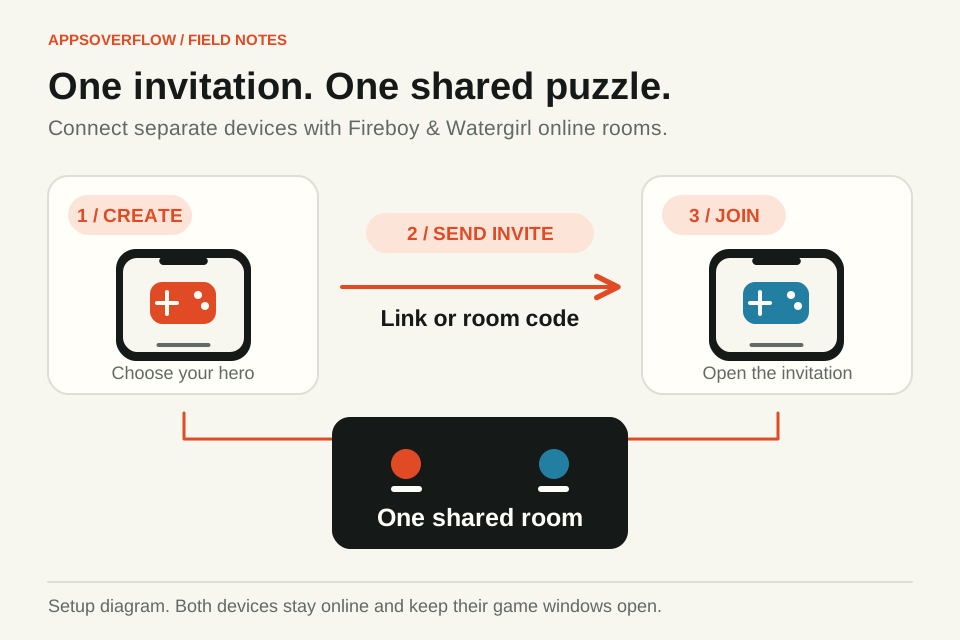
Create a room and send the invite
The first player picks Play online, chooses a hero and creates a room. Send your friend the invite link, or read out the six-character room code. They open the link and tap Join room, or type the code on the joining screen. Keep your window open while they connect.
Once both seats are filled, you’re ready. The room creator picks the campaign and level. If the game says your versions differ, refresh both browsers and make a new room.
One hero each
On a keyboard, move with the arrow keys and jump with Up, then press Enter to use a nearby device. WASD works too: W to jump and E to use. Since you each have your own device, you won’t fight over keys.
On a touch screen, hold the joystick left or right with one finger and tap Jump with another. The smaller Use button works levers and other devices. Let go of Jump before you press it again after landing, and keep your movement thumb down when you’re jumping across a gap.
Look before you move
Fireboy can cross orange lava and Watergirl can cross blue water. Each hero’s own element is safe for them and deadly for the other, and purple goo hurts both. So the safe route is usually different for each of you. Stop at the entrance and trace both paths before anyone runs ahead.
You need every ring-marked diamond, and then both heroes inside their own doors at the same time: orange for Fireboy, blue for Watergirl. Touching the door frame doesn’t count. Skipping a ring-marked diamond stops the room from finishing.
Agree on one small move at a time, like "wait on this platform" or "hold that switch". Try it, see what changes, then plan the next one. If both of you move at once, it’s hard to tell which switch did what. The Signal button helps here, with Wait, Come here, Stand here and Ready. The cues fade quickly, so send one when your friend can act on it. Either of you can pause or restart the room.
If something goes wrong
If the connection drops, the game pauses and tries to reconnect. Keep both tabs visible, and rejoin from the same browser session to get your seat back. If one of you keeps disappearing, check their connection and whether the device is going to sleep or switching apps.
Connected but stuck? Check the diamonds and the doors before you restart. If a jump fails, land, let go of Jump and try again. On most ice, including frozen water, you either can’t jump at all or only get a small hop, so step onto dry ground for a full jump. Level help in the menu explains the lift, switch or mechanism you’re looking at.
Where your progress lives
Joining a room doesn’t share your saves. Completed levels, best results and sound settings stay in your own browser, and clearing site data wipes them. An online room is for playing together, and it isn’t a cloud save.
This is an independent AppsOverFlow adaptation and isn’t an official Fireboy and Watergirl release. Keep the game guide handy for the current controls and help links. Once your room works, start with a level you’re happy to talk through and build up from there.
Quick answers
Can we play Fireboy & Watergirl online from different houses?
Yes. Online rooms work across different networks. Create a room, share the link or the six-character code, and keep both devices online.
Can one player use a phone and the other a computer?
Yes. The game has touch and keyboard controls, and each device controls its own hero. How smooth it feels depends on your device, browser and connection.
Why won’t the level finish when we reach the doors?
You need every ring-marked diamond, and both heroes fully inside their matching doors at the same time. Fireboy takes the orange door and Watergirl takes the blue one.
Does sharing a room share my saved progress?
No. Your progress stays in the browser that saved it and doesn’t sync between devices.
Sources & further reading
Product details checked on 7 October 2026. Features and availability may change after publication.