Start with controls and orientation
The table below comes from the current game guides and source. We haven’t tested these games on physical phones yet. Screen size, browser, memory and heat all matter, especially for a 3D game, so try a short session on your own device before you settle in.
Super Quest and Camber Reign need landscape for touch play. Their menus may still look fine in portrait, but the game won’t stay playable that way, so keep rotation unlocked.
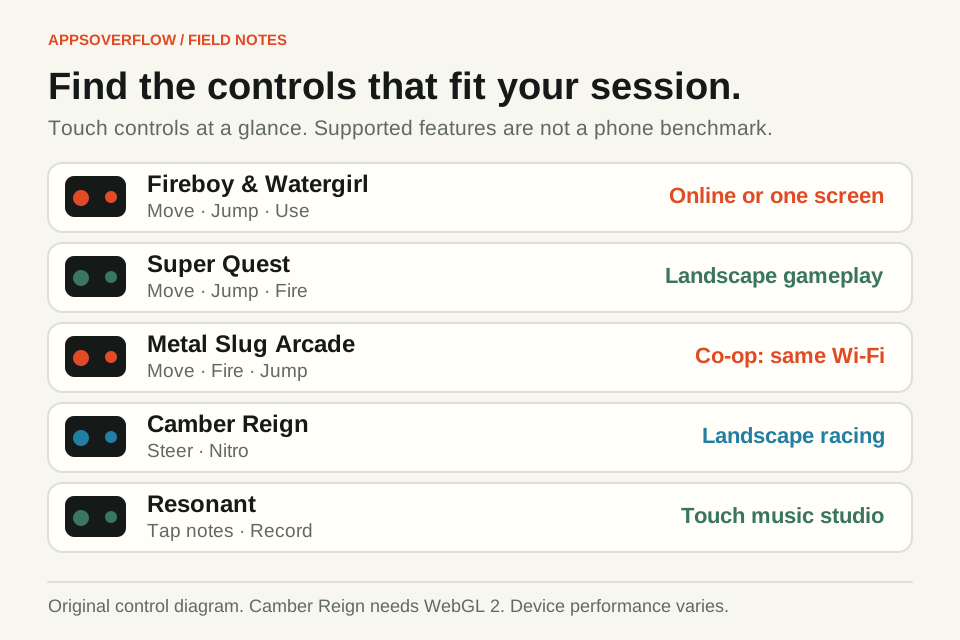
| Experience | Touch controls | Orientation | Playing together |
|---|---|---|---|
| Fireboy & Watergirl | Joystick, Jump and Use | Touch layout adapts to the screen | Shared device or online room |
| Super Quest | Joystick, Jump and contextual Fire | Landscape gameplay | Single player |
| Metal Slug Arcade | Adjustable joystick and action buttons | Saved portrait and landscape layouts | Two devices on the same Wi-Fi or hotspot |
| Camber Reign | Steering thumbpad and Nitro; optional Gyroscope | Landscape racing | Single player |
| Resonant | Instrument notes, keys, strings and studio controls | Page and instrument layouts adapt | Make music on your own device |
Fireboy & Watergirl: decide who holds what
You can share one touch screen or join an online room from two devices. On a phone, you start with one hero’s controls and a character selector, and you can pick Two players for shared controls. A small screen is often easier with one player per device.
Move with the joystick, tap Jump with another finger and use the smaller Use button on devices. Online rooms need an internet connection on both phones. The online co-op guide walks you through creating a room and sending the invite.
Super Quest: two thumbs, landscape screen
Super Quest is a solo platformer. Turn to landscape, then use one thumb on the joystick and the other for Jump. Pushing the joystick to its outer edge runs, and pulling down crouches or enters a marked echo gate. Pulse appears when you’re in Ember form.
Holding Jump gets you more height than a quick tap, so practise both on a safe platform before you cross gaps. If you turn the phone upright, play pauses until you rotate back. Start with First Light, and check the controls guide if a move feels unclear.
Metal Slug Arcade: fit the buttons to your hands
You can change touch-button size and opacity, move controls around and save separate portrait and landscape layouts. Open Options & Controls before a long mission. A bigger FIRE button helps, but if you enlarge everything, the controls will cover the action.
Pick Original proportions if Full width stretches the picture. For co-op, both phones need the same Wi-Fi or hotspot and have to stay in the foreground, which is different from Fireboy’s online rooms. The two-device setup guide shows how to swap the invite and reply.
Camber Reign: check the 3D requirements
Camber Reign needs a browser with WebGL 2 and races in landscape. Acceleration is automatic. Hold or drag the steering thumbpad to steer, let go to centre it and hold Nitro for a boost. A sharp turn at speed starts a drift, so there’s no drift button.
On compatible phones you can turn on Gyroscope from Pause, then Steering. Allow motion access if the browser asks, and recentre while holding the phone comfortably. Touch still works and overrides the gyroscope. We haven’t measured frame rates on real phones, so a short test race is the best way to check smoothness on yours.
Resonant, sound and saves
Resonant works by touch on phones and tablets. Open an instrument and tap a note to start the audio. In 3D view, choose Play for notes and gestures, or Rotate to look around the instrument. If the 3D view feels awkward, Classic view and the labelled note controls give you another way to play. On phones, the Classic piano shows one octave at a time.
Browsers handle full screen differently. Camber Reign asks for it where it’s supported. On iPhone Safari without page fullscreen, its Full-screen play help explains how to add the game to your Home Screen with Open as Web App turned on. That removes Safari’s address bar but doesn’t add offline play. If a game or instrument stays silent, tap a control to enable audio and check your phone’s sound settings. Keep the page visible during multiplayer or recording, and if the phone gets hot, pause and let it cool.
Saves stay in the browser you used, so opening the same address on another device won’t bring your progress along. Each app has its own backup and export tools, so check them before you clear site data or switch browsers. For your first visit, pick the one that matches your setup: share a puzzle, run a course, try an arcade mission, finish a short race or record a musical phrase. The AppsOverFlow collection links to every game and its full guide.
Quick answers
Which AppsOverFlow games require landscape on phones?
Super Quest and Camber Reign. Turning the phone upright pauses both.
Can I use Gyroscope steering in Camber Reign?
Yes, on compatible phones. Turn it on in Pause, then Steering, and allow motion access if the browser asks. Touch steering still works if sensors aren’t available or you prefer it.
Are all these games confirmed to run smoothly on every phone?
No. They all have touch controls, but smoothness depends on your device and browser, and Camber Reign needs WebGL 2. Try a short session on your own phone.
Do I need to install an app to try the collection?
No. Everything opens in your browser. Some games offer an optional Home Screen install, but that’s separate from offline play.
Sources & further reading
Product details checked on 24 October 2026. Features and availability may change after publication.