Pick the sound you want to keep
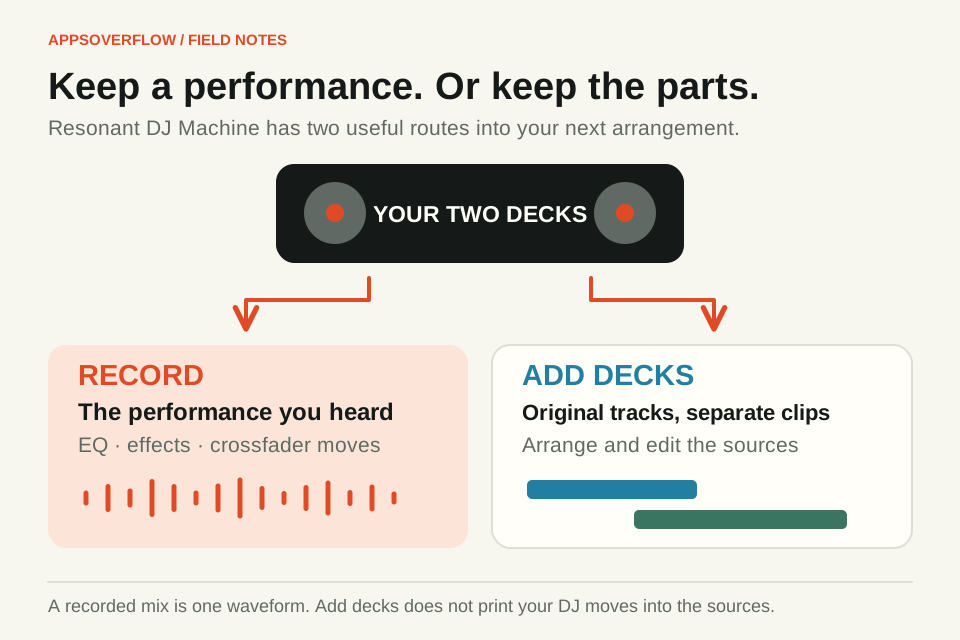
Record captures your live performance: both decks after the mixer, EQ, filter, echo and crossfader. Add decks to tune editor sends over the original source tracks instead. It doesn’t print your crossfader moves, tempo changes or effects into a finished mix.
Even with two simple tracks you’ll hear the difference. If you fade Deck B in slowly, the recording keeps that gradual entrance. The editor gives you the raw material to arrange again. Neither route replaces the other, so choose by what you want to change next.
| Action | What you keep | Best next step |
|---|---|---|
| Record the performance | One audible mix with the tempo, mixer moves and effects you played | Trim, fade, export or layer the finished performance |
| Add decks to tune editor | The original source audio in separate clips | Arrange the sources and make new edits |
Listen for the echo and the level change from seconds 3 to 6. Both examples use the same output gain. These are offline renders through Resonant’s actual sound and mixer code, not a recording of a person performing.
See the comparison settings
Neon Meridian melody, bass and chords from bar 9. Processed version: low EQ −6 dB, mid +2 dB, high −3 dB; echo 0.55 with a one-beat delay; Deck B crossfader moves from 1 to 0.5. No tempo change or microphone input.
Record the transition you actually played
Open DJ Machine and load your tracks, or hit Play Neon Meridian to try the original demo. Set a comfortable output level and practise a short transition first. The deck and master meters help you spot levels that are too hot, but they won’t master the track for you.
Press Record in the toolbar, perform the transition and stop. Then open Recordings and listen back. Recording doesn’t need microphone permission, since it captures the studio audio. Keep your first take short enough to compare, such as one entrance, one blend and one ending.
Download WAV gives you a copy to keep, and you can also bring a saved take into Tune Editor from its saved-take picker. That clip is the finished mix as one piece of audio. You can trim or fade it, but you can’t pull the echo or the individual decks back out of it.
Use the original decks when you want to edit more
Choose Add decks to tune editor when you want each source track to itself. In Tune Editor, name each clip and decide where it starts. Layer clips stacks material together, and Join clips end to end puts it in sequence. The start-time field is handy when dragging isn’t precise enough.
Split at playhead cuts a clip into pieces you can edit separately, and Duplicate repeats one using the same source audio. Per-clip trims, fades, volume and pan let you build a new version. Your original DJ performance isn’t hiding in there, though, so keep the recording if you might want that exact transition again.
Tempo, Key lock and syncing
The DJ tempo control changes playback speed, and with Key lock off the pitch follows. Turn Key lock on to keep the music at its original pitch while the tempo changes. Resonant prepares the audio on your device, so wait for it to finish before you judge or record the result. Small tempo changes sound best, so start modestly.
Tune Editor’s Bars & beats BPM only changes the ruler and snap grid, and it doesn’t stretch your audio. Setting the editor to your deck’s BPM won’t recreate a tempo-adjusted performance. If you want to keep how it sounded at that speed, record it.
Before you record, line the beats up. Match B tempo to A changes Deck B’s speed, and Sync beats · B to A also lines up its beat phase using the grids you’ve set. Check the detected BPM and mark a clear first downbeat on each track first, because a half-time rhythm can fool the estimate into half or double the tempo. Sync happens once and won’t keep correcting, and it doesn’t match musical phrases either, so listen through the transition and adjust your entry. A seek, a tempo change or an uneven manual loop may need another sync.
Try a quick comparison
Pick one track. Record a short section while you pull its channel level down and add a little echo. Stop, then send that deck’s original source to Tune Editor, and add your recorded take on another track.
Solo each track and trim both to the same passage. You’ll hear the level move and echo in the recording, while the source clip stays clean for a fresh arrangement. Try it again with a different transition, and you’ll soon know which version to keep.
Save a listening copy and an editable one
Export WAV renders what you hear in the editor into one file. Download editable saves your sources, clips and settings together in a .resonant-arrangement file you can reopen later. Keep both if you want one version to share and another to keep working on.
Resonant saves locally when your browser has space, so wait for the saved confirmation. Download anything important before you clear site data or switch devices. A few limits are worth knowing. Key lock works on mono or stereo audio up to three minutes, 64 MiB decoded and 96 kHz, within the console’s 0.5 to 1.5 times speed range. The editor handles eight tracks, 128 clips and a ten-minute mix. Ordinary audio imports can be up to 25 MB, and each studio recording can run up to five minutes.
Quick answers
Does Add decks to tune editor include my crossfader and EQ moves?
No. It sends the original deck sources. Record the DJ performance to keep your crossfader, EQ, filter, echo and tempo.
Can Tune Editor undo an effect inside a recorded DJ mix?
No. A recorded mix is one piece of audio. You can edit its timing, trims, fades, volume and pan, but the original decks and effects can’t be pulled apart again.
Does changing Tune Editor BPM stretch imported music?
No. That BPM only sets the ruler and snapping. If you want a tempo-adjusted performance in the editor, record it from the DJ console.
Sources & further reading
Product details checked on 7 October 2026. Features and availability may change after publication.